Using Kaspersky Open Source Software Threats Data Feed
CodeScoring integrates the Kaspersky Open Source Software Threats Data Feed (Kaspersky OSSTDF) feed into the CodeScoring.SCA and CodeScoring.OSA modules, providing access to information about threats in detected open source components. The feed is useful not only as a source of data on new vulnerabilities, but also as a tool for enriching already known records from other sources.
The feed is integrated at the CodeScoring Index knowledge base level, which ensures deduplication of detected vulnerabilities and a single data presentation for the user.
Connection check
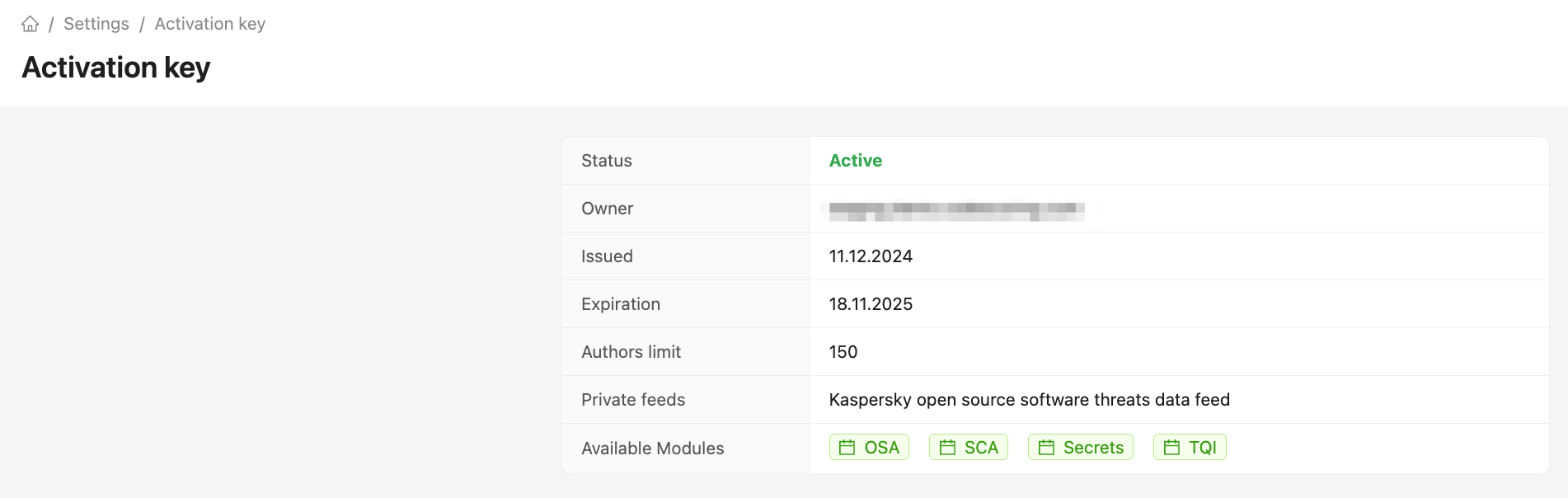
The CodeScoring activation key contains data on the availability of private feeds.
If Kaspersky OSSTDF is successfully connected, the "Private feeds" field in the Settings -> Activation Key section has the value “Kaspersky open source software threats data feed”.
Analysis results
CodeScoring integrates the feed not only from a data perspective, but also contextual extensions of functionality. In particular, with the connection of the feed, the Impacts field appears in the list of vulnerabilities and their individual pages, for which a separate security policy can be configured. The field value indicates the impact on the system that the threat has.
For example, the abbreviation RLF means Read Local Files - such a vulnerability allows access to read files on the user's device. This information helps to understand the context of the vulnerability and determine the direction of a potential attack.
The list of possible values of the variable:
- Arbitrary code execution (ACE);
- Code injection (CI);
- Denial of service (DoS);
- Loss of integrity (LoI);
- Overwriting arbitrary files (OAF);
- Obtaining sensitive information (OSI);
- Privilege escalation (PE);
- Reading local files (RLF);
- Security bypass (SB);
- Substitution of the user interface (SUI);
- Writing local files (WLF);
- Cross-site scripting (XSS/CSS).
In case of compromised packets, this field has the value Other.
For packets with malicious code, the following values are possible, among others:
- Malware;
- Hacktool.
More details about the available fields can be found in the OSSTDF documentation.
Vulnerability details
Additional information appears on the vulnerability page obtained from the Kaspersky OSSTDF feed. The table with the main data contains the Kaspersky field, which can be used to determine the vulnerability ID, and the Impacts (Kaspersky) field.
Setting up policies
The data from the feed can be used to create security policies for both analyzing the current code base and checking downloaded components.
The "Impacts" field allows to precisely specify the types of vulnerabilities that require attention. For example, to set up a policy that blocks the use of components with malicious code, one needs to create the condition Vulnerability mpacts (Kaspersky) -> exactly match -> Malware.