Sfera plugin
Plugin installation
The plugin is delivered as a jar-file.
To install the plugin in Sfera, you need to:
- Place the plugin jar file and config file
codescoring.yamlinto thepluginsfolder located in the application's PPDL working directory. - (Optional) To manage enabling/disabling of plugins, you can create
enabled.txtordisabled.txtfiles in thepluginsfolder.- The file should list the names of the plugins to be enabled or disabled.
- Enable/Disable logic:
- plugin in
disabled.txt- disabled; enabled.txtis not empty and does not contain the plugin - disabled;- in other cases, the plugin is enabled.
- plugin in
Plugin configuration
The codescoring.yaml file is used to configure the plugin.
Example file content:
codeScoringAPI:
  # The base URL for all CodeScoring API endpoints.
  # Required.
  # Example: https://host:port or https://host
  url:

  # Your CodeScoring API Token for authentication.
  # Required.
  token:

  # Http client connection pool size to CodeScoring BE service.
  connectionPoolSize: 50

  # By default, if CodeScoring API hasn't responded within a duration of 60 seconds, the request will be cancelled.
  # This property lets you customize the timeout duration in seconds.
  timeout: 60

  # If you are using a proxy, you must provide both Hostname/IP and port.
  proxy:
    host:
    port:

# If set to 'false' allows artifact downloads regardless of errors from CodeScoringAPI or plugin
blockOnErrors: true

# If set to 'true', the plugin will scan all supported repositories
# except specified in the "excludeRepositories" section.
scanAllRepositories: false

# Default settings for all repositories. Can be overridden by repositories.repo-name settings
defaults:
  dockerRegistryUrl: registry.my.domain

  # warmup |  Scan cache warmup without requests monitoring, no blocking
  # spectator | Scan cache warmup with requests monitoring, no blocking
  # moderate | Policy-based blocking using cache results, not scanned component downloads allowed
  # strict | Policy-based blocking using cache results, not scanned component downloads blocked
  # strict_wait | Policy-based blocking, wait until component is scanned
  # default value is strict_wait if not specified in default or repository settings or in case of a typo
  workMode: strict_wait

  # Allows this user to skip scan
  skipScanUser: codescoring

  # Repository Manager url for CodeScoring to apply policies.
  # Value MUST BE equal to Repository Manager URL in CodeScoring
  # Example: https://sfera.my.domain.ru
  repositoryManagerUrl:

# Settings per repository
# Example:
# repositories:
#   docker-remote:
#   docker-local:
#     dockerRegistryUrl: another-registry.my.domain
#     skipScanUser: anotheruser
#     workMode: spectator
#   pypi-remote:
#     workMode: warmup
repositories:

# List of the excluded repositories. Used, if scanAllRepositories=true
# Example:
# excludeRepositories:
#   - npm-remote
#   - maven-local
excludeRepositories:

# List of repository types to scan. Used, if scanAllRepositories=true
# Supported values are: maven, npm, pypi, nuget, go, gems, debian, yum, alpine, docker
# Example:
# repositoryTypes:
#   - npm
#   - go
repositoryTypes:
Parameter Description
- codeScoringAPI - configuration parameters for plugin interaction with the CodeScoring platform;
- url – CodeScoring platform address (protocol must be specified);
- token – API key for authorization (Created in CodeScoring section
Profile -> Home); - connectionPoolSize – connection pool size for CodeScoring platform;
- timeout - response timeout (in seconds). By default, if CodeScoring API does not respond within 60 seconds, the request will be cancelled;
- proxy - proxy server settings;
- host - host/IP;
- port - port;
- blockOnErrors - block component downloads in case of an error during interaction with the CodeScoring platform;
- scanAllRepositories - enable scanning for all supported repositories except those specified in the excludeRepositories parameter;
- defaults – default scanning settings for all connected repositories;
- dockerRegistryUrl – docker registry address;
- workMode – plugin operation mode. Conditions for each mode are described in the section below;
- skipScanUser – user for whom component scanning is skipped. Necessary so that CodeScoring can independently retrieve the component for scanning;
- repositoryManagerUrl - Sfera URL. The same URL must be specified in CodeScoring to apply policies by repositories.
- repositories – list of repositories for which component scanning is active. Parameters can be specified separately for each repository, same as in defaults;
- excludeRepositories - list of repository names excluded from processing by the plugin.
Work Mode Configuration
The plugin's operation mode is determined by the workMode variable in the codescoring.yaml file.
The plugin has 6 modes of operation that determine the strictness of component verification before download.
- warmup – load data into CodeScoring cache without blocking components;
- spectator – load data into CodeScoring cache without blocking components, save component request results on the platform;
- moderate – block components that fail policy checks. Downloading unscanned components is allowed;
- strict – block components that fail policy checks. Downloading unscanned components is forbidden;
- strict_wait – block components that fail policy checks. Wait for verification for unscanned components.
Important: the selected operation mode will affect all repositories specified in the repositories variable.
Component Blocking
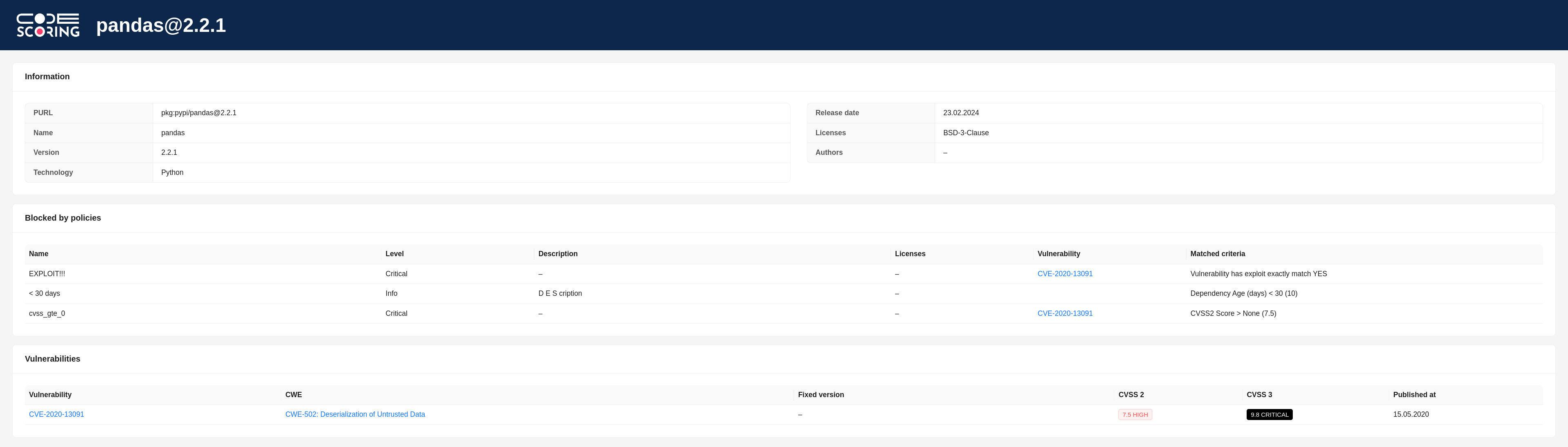
When a component download is blocked, one of the following blocking reasons is displayed in the user console:
- "The download has been blocked in accordance with the policies configured in CodeScoring" – component blocked according to policies configured on the platform;
- "The component has not yet been scanned by CodeScoring, it is scheduled to be scanned shortly. The download is blocked according to the plugin settings" – blocked unscanned component with subsequent scan initiation. Used in
strictmode; - "The download has been blocked due to the failure of the scan of the component in CodeScoring" – failed to scan the component;
- "The download has been blocked due to the wrong mode of the plugin" – incorrect plugin operation mode is used;
- "The download has been blocked due to the timeout of the scan of the component in CodeScoring" – component scan timeout expired. Used in
strict_waitmode; - "The download has been blocked, because registry is not configured in CodeScoring" – corresponding Registry is missing in the platform.
The response also contains a link to the component page in CodeScoring with information about triggered security policies and found vulnerabilities: