
Exporting analysis results
Exporting to CSV
Each table with analysis results in CodeScoring can be exported in CSV format using the Export button in the upper right corner of the interface.
The CSV table will take into account the filters used at the time of export.
Generating a PDF report on a project
After performing composition analysis, the generation of a PDF report with summary information on the project becomes available on the project page.
You can export a PDF report with the latest analysis data on the project page using the Export PDF button. You can export an analysis report for a specific date on the SCA Scan History page.
The report will be generated in the language set in the user profile.
The resulting report contains the following data by default:
- general information on the project (name, VCS branch, time of the last analysis, commit hash);
- distribution of vulnerabilities by CVSS;
- distribution of vulnerabilities by technology;
- table of found dependencies divided by technologies and development environment;
- table of found vulnerabilities divided by technologies and development environment;
- table of active policy alerts;
- table of policy ignores;
- dependency graph.
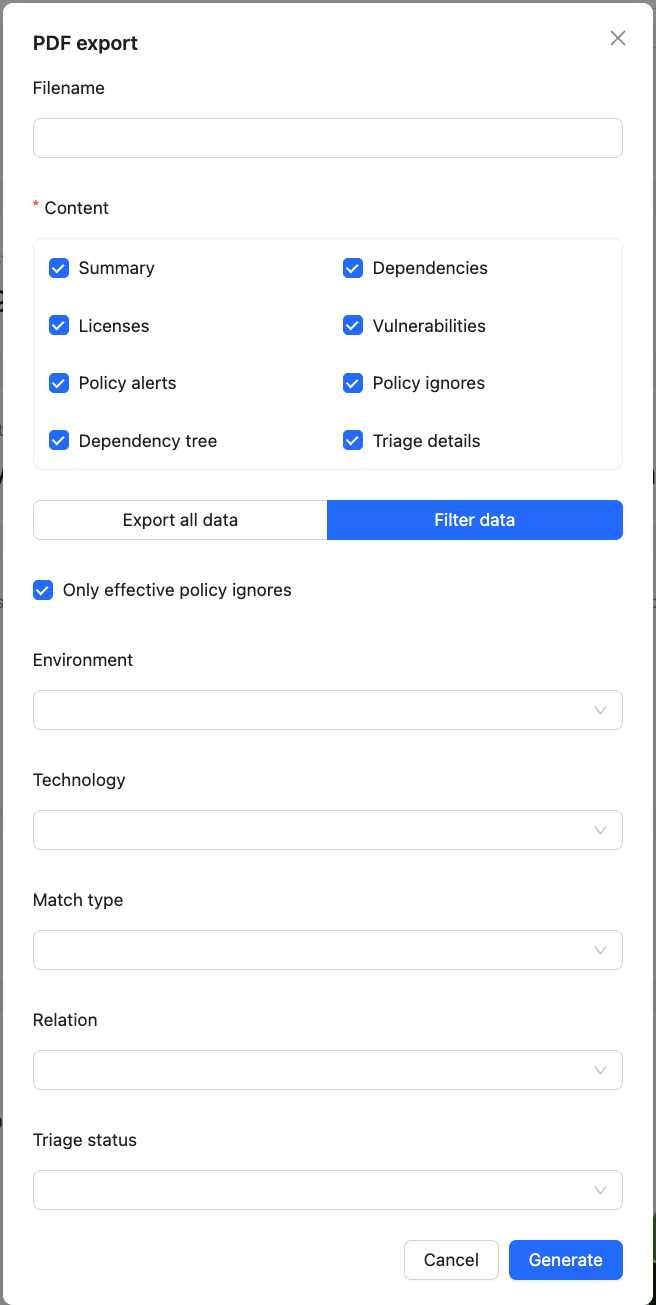
It's also possible to define a custom filename, choose required data blocks and filter data before export. By default, the report will list only effective policy ignores. Effective ignores are those that are applied to policies that are currently active. To display all policy ignores in the list, you need to uncheck the "Only effective policy ignores" checkbox.
If a filename is not set, it will be generated automatically according to the following rules:
- For projects:
report_<project name>.pdf - For container images:
report_<image name>_<first 8 hash chars>.pdf
Working with SBOM within a project
After performing composition analysis of the project it becomes possible to export the obtained list of used components (SBOM) in CycloneDX format.
You can export the obtained SBOM on the project page in the Projects section by clicking the Export SBOM button.
SBOM export is supported in the following formats:
- CycloneDX v1.4 JSON;
- CycloneDX v1.5 JSON;
- CycloneDX v1.6 JSON;
- CycloneDX v1.6 Ext JSON – extended CycloneDX format containing additional properties:
GOST:attack_surface,GOST:security_function,GOST:source_lang,GOST:provided_by. The format is adapted to additional requirements for the SBOM from the FSTEC of Russia. - CycloneDX v1.7 JSON;
- CycloneDX v1.7 Ext JSON – extended CycloneDX format containing additional properties:
GOST:attack_surface,GOST:security_function,GOST:source_lang,GOST:provided_by. The format is adapted to additional requirements for the SBOM from the FSTEC of Russia. - SPDX v2.3 JSON
CodeScoring properties in CycloneDX
CodeScoring adds the following properties to each component in an exported CycloneDX SBOM:
CodeScoring also adds the following properties to vulnerabilities:
SBOM export also supports additional export customization, like the PDF one. Automatic SBOM filename generation rules are following:
- For projects:
bom_<project name>_<SBOM format>.json - For container images:
bom_<image name>_<first 8 hash chars>_<SBOM format>.json
Scan SBOM
SBOM upload via the interface is available on the project page using the Scan SBOM button (if the user has permission to run SCA analysis).
The loaded SBOM must be in CycloneDX v1.4, 1.5, 1.6, 1.6_ext, 1.7 or 1.7_ext format and have the .json extension.
When scanning an SBOM on the project page, you can also add a branch or tag name as meta-information.
For recommendations on checking component identifiers, see PURL construction guidelines.
Configuring dependency properties for SBOM export
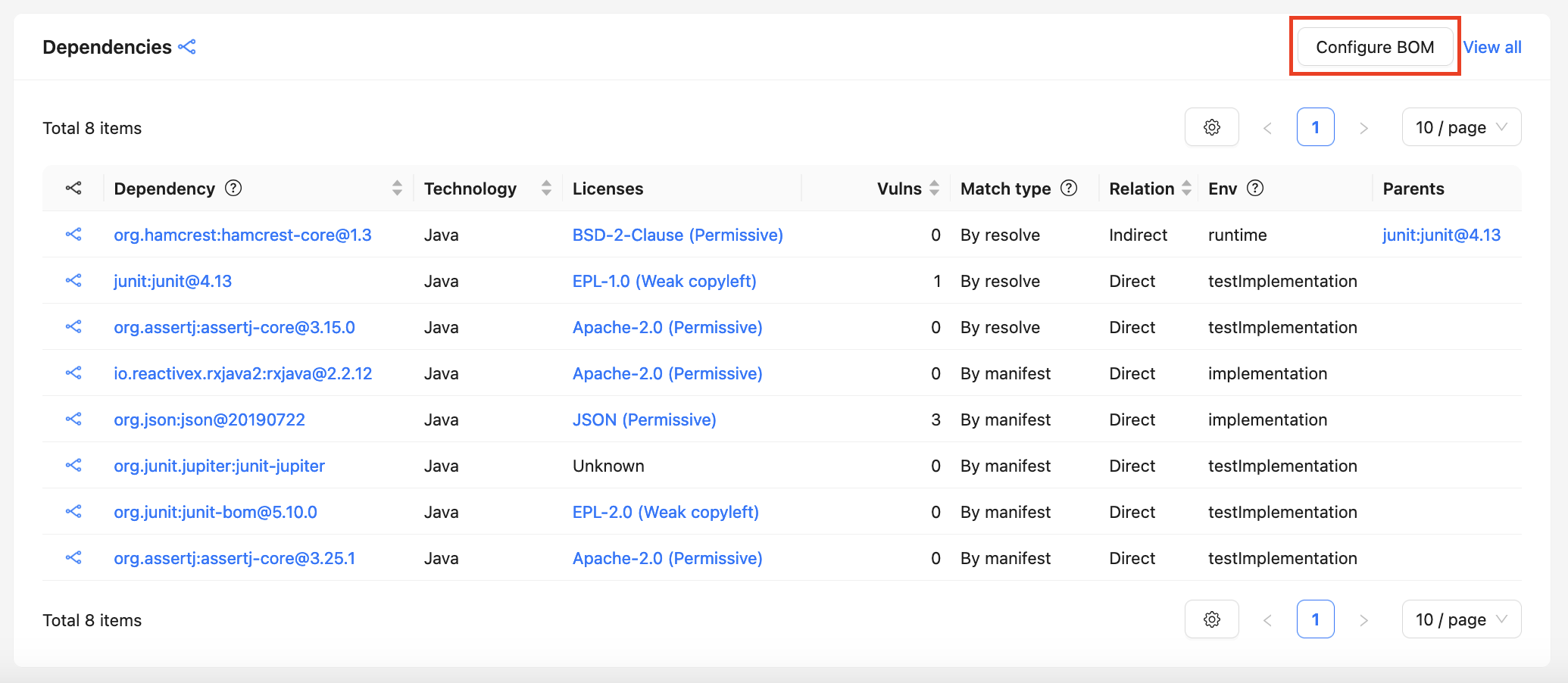
To configure dependency properties, go to the page by clicking the Configure dependencies button in the Dependencies table of the project.
The page allows you to specify the attack surface (Attack surface), security function (Security function), version control system (VCS) and licenses for each project component.
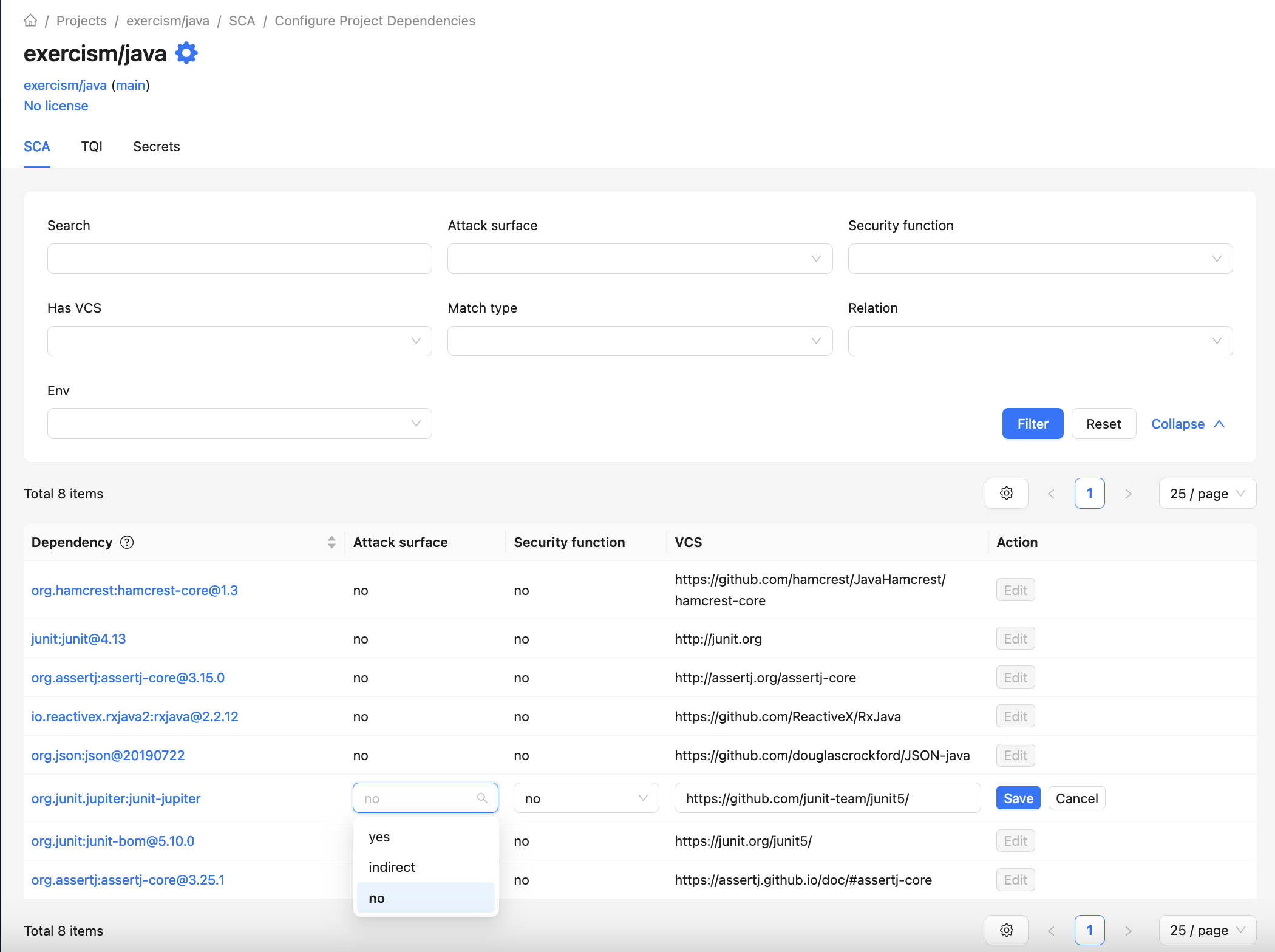
The values entered are taken into account:
- when exporting SBOM from the project page;
- when exporting SBOM from the scan results history page (for the most recent successful SCA scan);
- during subsequent scans of the project;
- when scanning the project via the Johnny console agent;
- in the project dashboard;
- on the license page.
Important: Changes to values do not apply to previous scans of the project and only relate to the SBOM of the current project, even if a dependency is used in multiple projects.
VCS
The VCS field allows you to specify the URL of the repository where the dependency code is stored. When exporting SBOM, the selected value is taken into account in the externalReferences field.
Source Distribution
The Source Distribution field contains the URL of the package's source code. When exporting SBOM, the selected value is taken into account in the externalReferences field.
Attack surface
The Attack surface field allows you to specify whether the component belongs to an attack surface. You can select one of the following values:
yes— the component is part of the direct attack surface;indirect— the component is part of the indirect attack surface;no— otherwise (default value).
When exporting SBOM in the CycloneDX v1.6 Ext JSON and CycloneDX v1.7 Ext JSON formats, the selected value is taken into account in the GOST:attack_surface property of the component.
Security function
The Security function field allows you to specify whether the component belongs to the security functions of the information security tool. You can select one of the following values:
yes— if the component functions directly implement security functions;indirect— if the component functions participate in the implementation of security functions, interacting with components implementing security functions;no— if the component functions do not participate in the implementation of security functions (default value).
When exporting SBOM in the CycloneDX v1.6 Ext JSON and CycloneDX v1.7 Ext JSON formats, the selected value is taken into account in the "GOST:security_function" property of the component.
Provided by
The Provided by field lets you specify affiliation of the component to the information security tool from which this component was borrowed. You can enter any arbitrary text value.
When exporting SBOM in the CycloneDX v1.6 Ext JSON and CycloneDX v1.7 Ext JSON formats, the specified value is taken into account in the "GOST:provided_by" property of the component.
Licenses
The Licenses field allows you to specify the licenses of the component.
If an empty list is specified, the values found during the last SCA analysis are selected.
When exporting SBOM, the selected values are taken into account in the licenses field of the component.