
Managing policies
General description
Policies on the CodeScoring platform are a mechanism for tracking and blocking open source components during software development. They can be related to security checks, license compatibility, or other criteria for including third-party components in development.
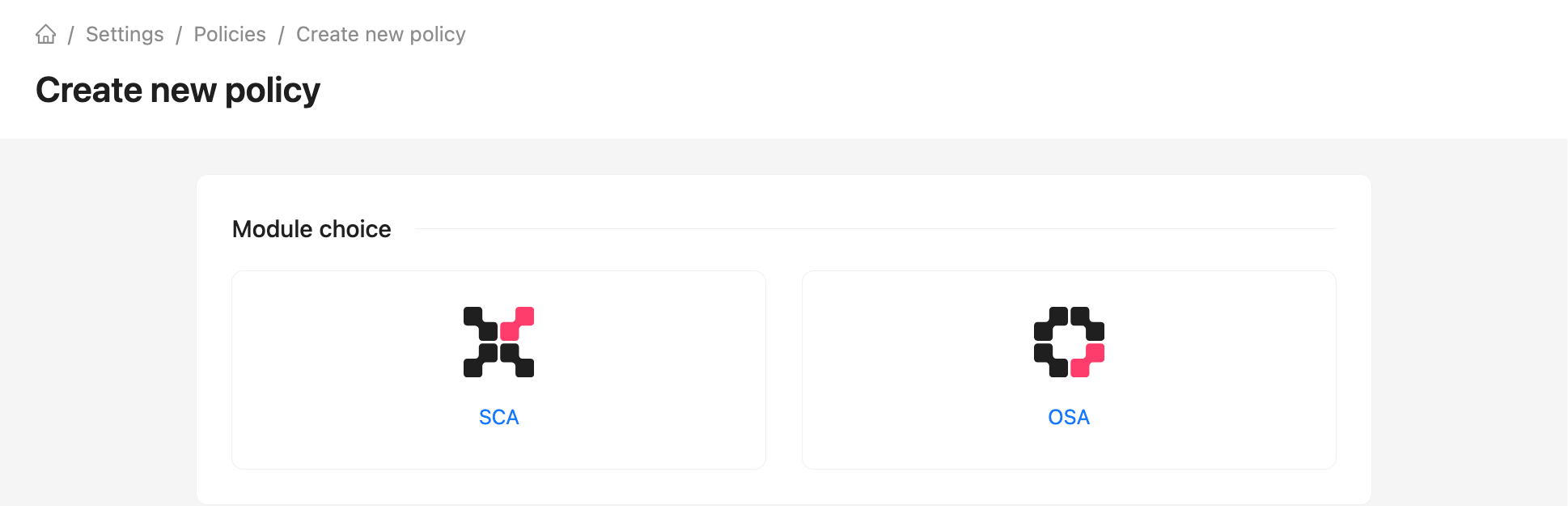
Select a module when creating a policy:
- SCA — project and build analysis. You can limit the policy to proprietors, project groups, and projects, and select its stages.
- OSA — package and container image checks in artifact repositories. You can select component types and repositories; the policy uses the
proxystage.
You cannot change a policy's module after creation. Create a separate policy for the other module.
The policy mechanism takes into account the specified stage of software development: from the download of third-party components into the organization's perimeter to tracking builds and writing new code.
Policies are configured based on conditions combined by logical expressions AND/OR. In addition to the standard security policy settings based on vulnerability severity level, conditions can be configured based on component metadata: release date, license, author, and others. A total of 70+ categorized conditions are supported. The checks also include a built-in policy for checking for license compatibility.
When a policy is triggered, corresponding alerts are created in CodeScoring. Alerts can be temporarily or permanently ignored, or they can be downloaded as a report.
Policies can be blocking: when such a policy is triggered, the components used are blocked in the artifact storage (proxy repositories), or the CI build is stopped until the detected defect is fixed.
Additionally, when a policy is triggered, a notification can be sent to the responsible specialists in the task management system or an email describing the problem.
Policy stages
For SCA policies, stages are configured in the Policy stage field under Settings → Projects, or specified with --stage when running the Johnny agent. The stages have the following meanings:
dev– development stage;stage– intermediate (pre-production) stage;test– testing stage;prod– production circuit.
When creating or editing an SCA policy under Settings → Policies, specify the stages to which it applies.
In addition, there are special stage values used by default for certain tasks:
proxy– for the plugin in the OSA module;source– for analysis of projects with a VCS link;build– for the Johnny console agent.
OSA policies use only the proxy stage. It is assigned automatically and cannot be selected for an SCA policy.
Creating a policy
Policies are created under Settings -> Policies. Click Create and select the SCA or OSA module. The policy list shows the module in a separate column and supports filtering by module.
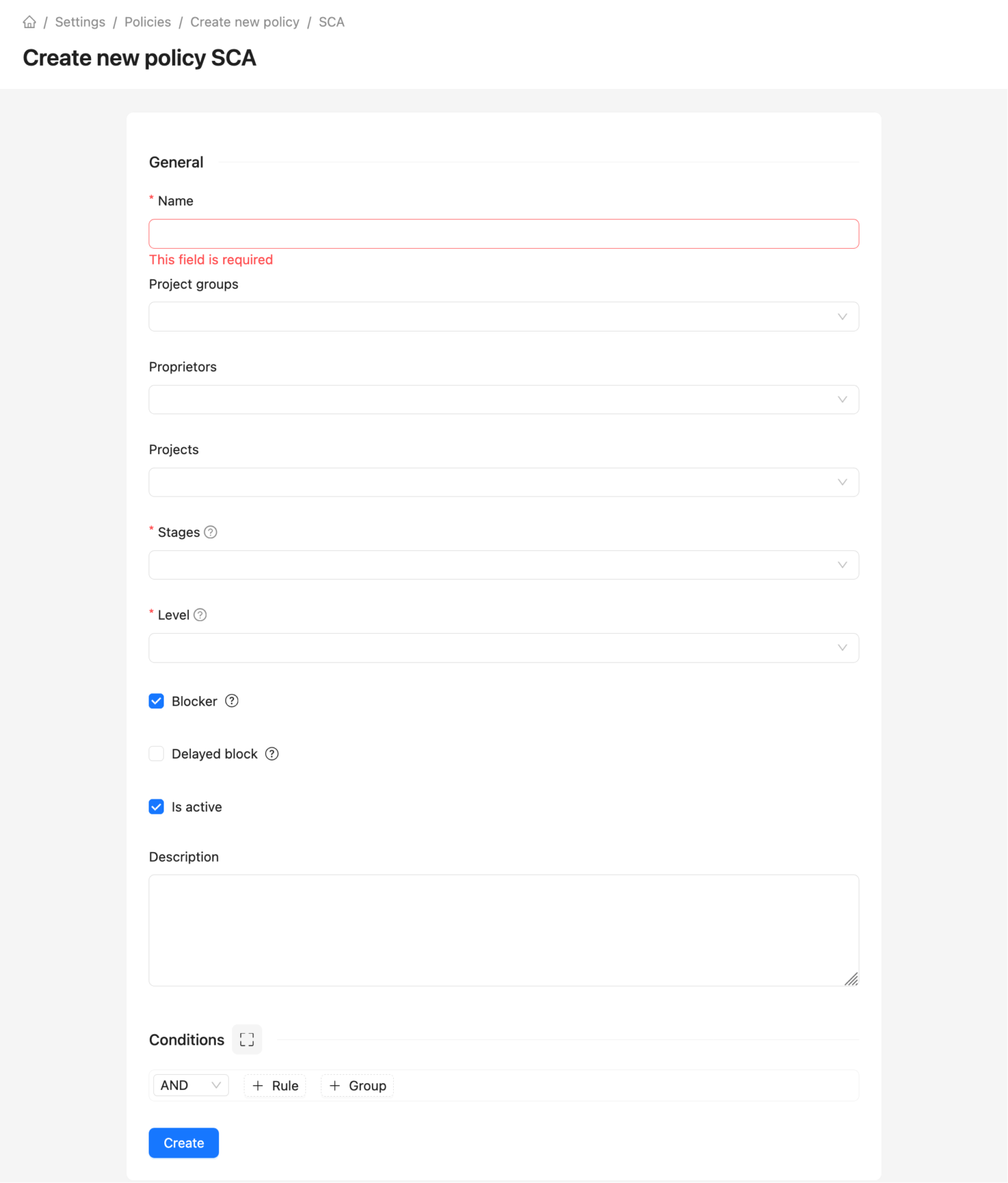
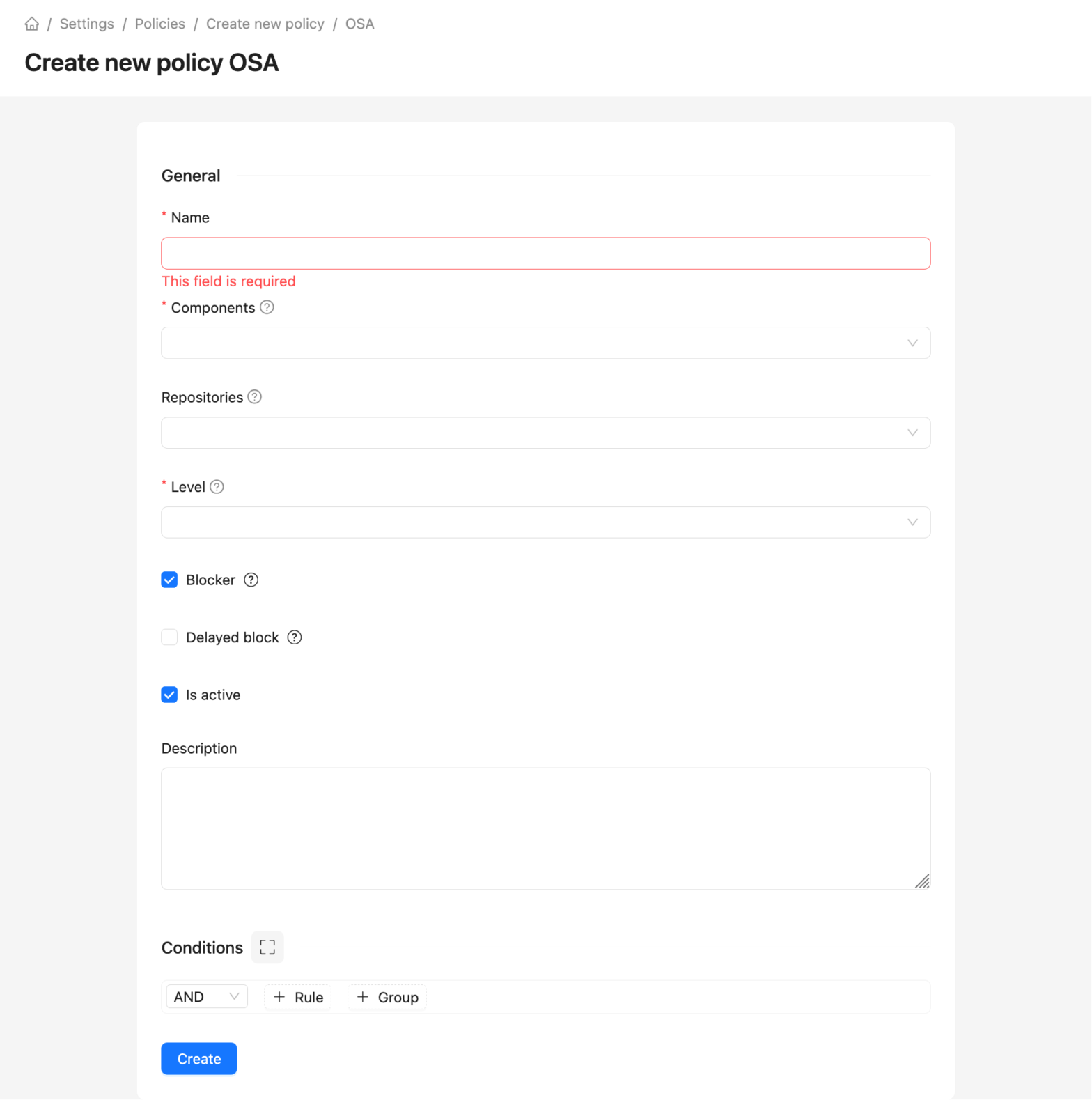
Fields shared by both modules:
- Name;
- Level — policy criticality level (does not affect actions in the system);
- Blocker — blocking CI build or download of a component from a proxy repository;
- Delayed block — delay (days) from the first policy trigger to blocking;
- Is active — policy status;
- Description — policy description;
- Conditions — list of conditions in the policy.
For SCA, also specify Groups, Proprietors, Projects, and the required Stages. If proprietors, groups, and projects are empty, the policy applies to all matching projects.
For OSA, select the required OSA Components (Packages or Container Images) and, optionally, Repositories with the OSA plugin. Only Docker repositories can be selected for container images.
Available conditions depend on the module. Transitivity depth, descendant dependencies, vulnerability reachability, environment, detection method, dependency relation, and license incompatibility with the project's license are SCA-only. Repository and repository manager conditions are OSA-only. The remaining conditions below are available in both modules unless stated otherwise.
Next, the conditions for triggering the policy are configured; the following parameters are supported:
- PURL — package URL, component identifier;
- Dependency name — name of the used dependency;
- Dependency version — specific version of the component detected in the project;
- Dependency author — name or organization listed as the author of the dependency;
- Dependency release date — date when the dependency version was first published;
- Dependency age (days) — number of days since the dependency was published;
- Dependency vulnerability count — total number of known vulnerabilities in the component;
- Dependency is dangerous — the dependency is considered dangerous if it includes any vulnerabilities with:
- prefix
MAL-(malicious package feed from OSV); - one of the following CWEs:
- CWE-506: Embedded Malicious Code;
- CWE-507: Trojan;
- CWE-508: Non-Propagating Malicious Code;
- CWE-509: Propagating Malicious Code (virus or worm);
- CWE-510: Hidden Functionality;
- CWE-511: Logic or Time Bomb;
- CWE-512: Spyware;
- CWE-912: Backdoor Function;
- or one of the following Impacts values from Kaspersky OSS Threats Data Feed:
- Malicious software;
- Other impact.
- prefix
- Dependency is protestware — the dependency is considered protestware if it includes any vulnerabilities from the proprietary protestware feed;
- Dependency is ransomware — the dependency is considered ransomware if it includes any vulnerabilities used in ransomware according to CISA KEV;
- Dependency is revoked - dependency is revoked from source;
- Dependency is inner source — indicates that the dependency is an internally developed package (inner source). This condition is available only for SCA policies;
- Dependency is a descendant of — searches across all levels for lower-level transitive dependencies associated with the specified parent component (e.g. in
a<-b<-c<-d,canddare descendants ofb); - Dependency Transitivity depth - controls the depth of the dependency search, where 1 is a direct dependency, 2 or more are transitive. Only natural numbers are allowed;
- Technology — programming language or ecosystem;
- License — SPDX license identifier;
- License category — classification of the license (e.g. permissive, copyleft);
- Vulnerability ID — vulnerability identifier;
- CVSS2 Score — numerical threat score according to the CVSS 2 standard;
- CVSS2 Severity — threat level according to the CVSS 2 standard;
- CVSS2 Access Vector (AV) — vulnerability exploitation path (physical or network);
- CVSS2 Access Complexity (AC) — vulnerability exploitation complexity;
- CVSS2 Authentication (Au) — authentication requirements for vulnerability exploitation;
- CVSS2 Availability Impact (A) — degree of data availability loss;
- CVSS2 Confidentiality Impact (C) — degree of data confidentiality loss;
- CVSS2 Integrity Impact (I) — degree of data integrity loss;
- CVSS3 Score — numerical CVSS 3 threat assessment;
- CVSS3 Severity — threat level according to the CVSS 3 standard;
- CVSS3 Attack Vector (AV) — attack vector;
- CVSS3 Attack Complexity (AC) — attack complexity;
- CVSS3 Privileges Required (PR) — required access level to exploit the vulnerability;
- CVSS3 User Interaction (UI) — presence of user interaction;
- CVSS3 Scope (S) — component security scope;
- CVSS3 Confidentiality (C) — degree of loss of data confidentiality;
- CVSS3 Integrity (I) — degree of loss of data integrity;
- CVSS3 Availability (A) — degree of loss of data availability;
- CVSS4 Score — numerical CVSS 4 threat assessment;
- CVSS4 Severity — threat level according to the CVSS 4 standard;
- CVSS4 Attack Vector (AV) — attack vector;
- CVSS4 Attack Complexity (AC) — attack complexity;
- CVSS4 Attack Requirements (AT) — whether any attack prerequisites required;
- CVSS4 Privileges Required (PR) — required access level to exploit the vulnerabilit;
- CVSS4 User Interaction (UI) — presence of user interaction;
- CVSS4 Confidentiality Impact to the Vulnerable System (VC) — confidentiality impact to the vulnerable system;
- CVSS4 Confidentiality Impact to the Subsequent System (SC) — confidentiality impact to the subsequent system;
- CVSS4 Integrity Impact to the Vulnerable System (VI) — integrity impact to the vulnerable system;
- CVSS4 Integrity Impact to the Subsequent System (SI) — integrity impact to the subsequent system;
- CVSS4 Availability Impact to the Vulnerable System (VA) — availability impact to the vulnerable system;
- CVSS4 Availability Impact to the Subsequent System (SA) — availability impact to the subsequent system;
- Vulnerability publication date — initial disclosure date of the vulnerability;
- Vulnerability update date — most recent update of the vulnerability record;
- Vulnerability impacts (Kaspersky) — possible Impacts values from Kaspersky OSS Threats Data Feed;
- Vulnerability has exploit — indicates the presence of a public exploit in databases like NVD, GHSA, FSTEC, etc.;
- Vulnerability has fixed version — indicates the availability of a safe version that mitigates the vulnerability;
- Vulnerability is reachable – the vulnerable method of the component is used in the source code. More details about reachability analysis can be found in the Johnny agent documentation.
- Vulnerability age (days) — number of days since the vulnerability was disclosed;
- Env — development environment (e.g., prod, dev, source);
- Match type — dependency detection method (by manifest, project content, or as a result of dependency resolution);
- Relation — dependency relationship in the project (direct or transitive);
- CWE — vulnerability type identifier according to the Common Weakness Enumeration standard;
- Repository — name of the repository in the repository manager from which the component was obtained;
- Repository Manager — name of the connected repository manager;
- Protest package category — protestware category;
- SSVC2 Exploitation — the present state of exploitation of the vulnerability;
- SSVC2 Automatable — can the vulnerability exploitation be automated;
- SSVC2 Technical impact — technical impact to the vulnerable system;
- EPSS percentage — estimated probability that the vulnerability will be exploited within the next 30 days;
- EPSS percentile — the share of vulnerabilities with the same or lower percentage.
There is an option to specify list-based values for the following parameters:
- PURL list
- Dependency name list
- Dependency author email list
- Vulnerability ID list
- Environment list
- Technology list
- License list
- License category list
- CWE list
- Repository list
- CVSS2 severity list
- CVSS3 severity list
- CVSS4 severity list
- Protest package category list
Creating a copy of the policy
If you need to duplicate an existing policy, you can use the context menu item Create a copy or click the button.
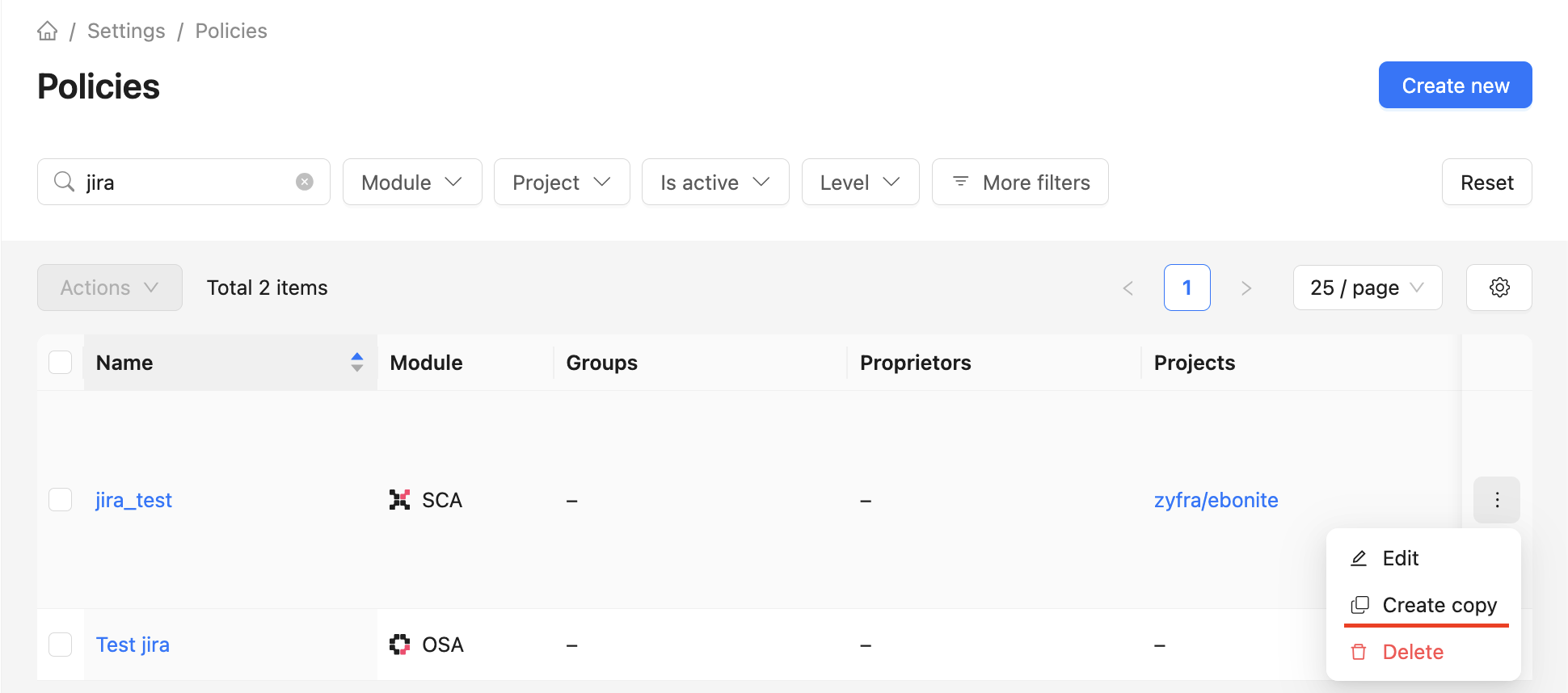
Or click on the policy form Create a copy.
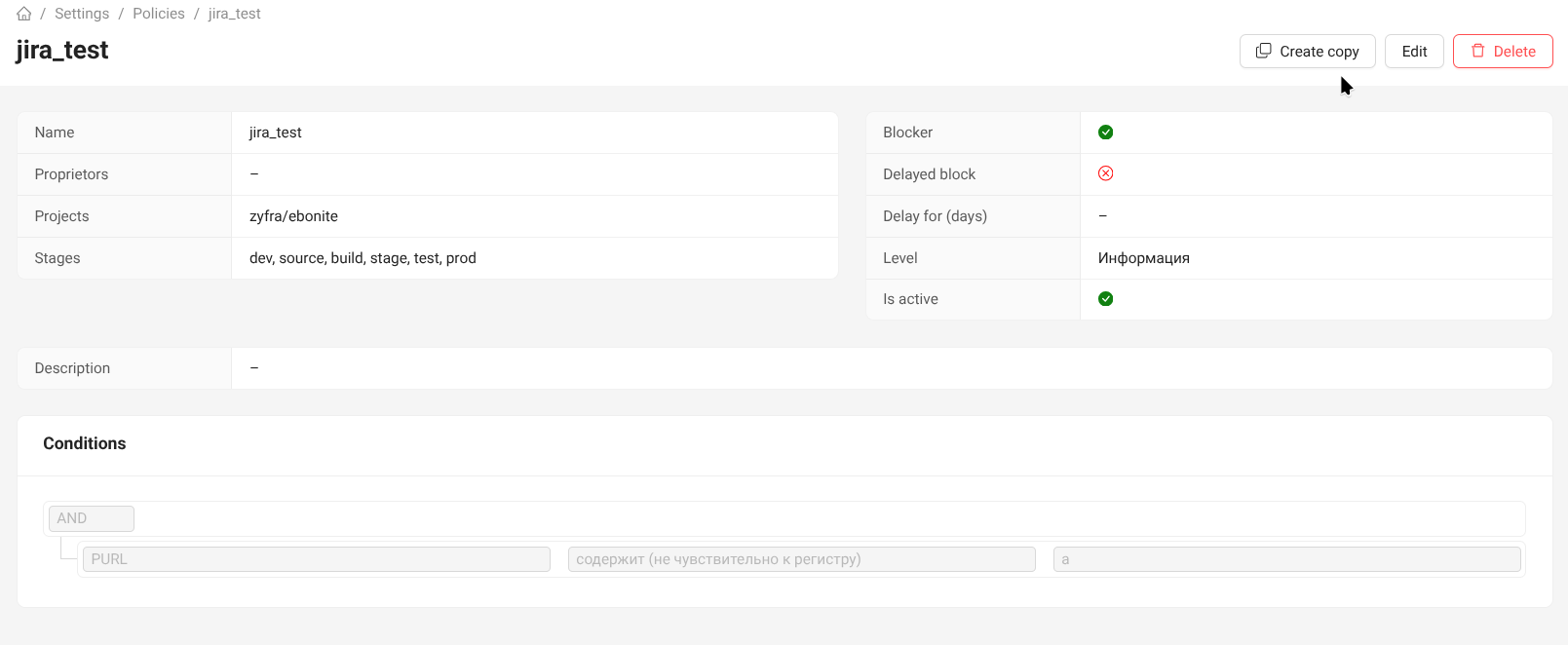
The copy uses the same module as the original policy and retains its description, conditions, and related actions. Related actions cannot be copied from a policy in another module.
Policies after upgrading
During the module split, policies with only the proxy stage become OSA policies; policies without proxy become SCA policies. A policy with both proxy and other stages is split: the original remains in SCA without proxy, and a separate OSA policy is created for proxy. Names and conditions are preserved; linked repositories move to OSA, while proprietors, groups, and projects remain in SCA. Notification actions are copied to OSA without group and project restrictions.
After upgrading, review the conditions of all affected SCA and OSA policies, including policies that were not split into two records. The condition tree is preserved unchanged, so it may contain conditions unavailable in the policy's new module. For example, an OSA policy may retain the License — is incompatible operator or a Relation condition, while an SCA policy may retain a Repository condition.
Such policies are not deactivated automatically. Incompatible conditions still participate in evaluation; in OSA, they may produce a constant true or false result and change the outcome of AND/OR groups. A policy with an incompatible condition will fail validation on the next edit. Review and fix the conditions after upgrading.
Policy example
Policy conditions can be combined into groups using logical expressions AND/OR. Groups have no restrictions on the nesting level and the number of conditions.
For example, you can set policy conditions for the following scenario - either the dependency contains a vulnerability with an exploit and a fixed version, or the dependency is direct and contains a critical vulnerability according to the CVSS 3 standard.
To create such a policy, you need to add two groups united by the OR expression. This means that the policy will be triggered if any of the listed groups of conditions are met. Within the group, conditions are set, united by the AND expression.
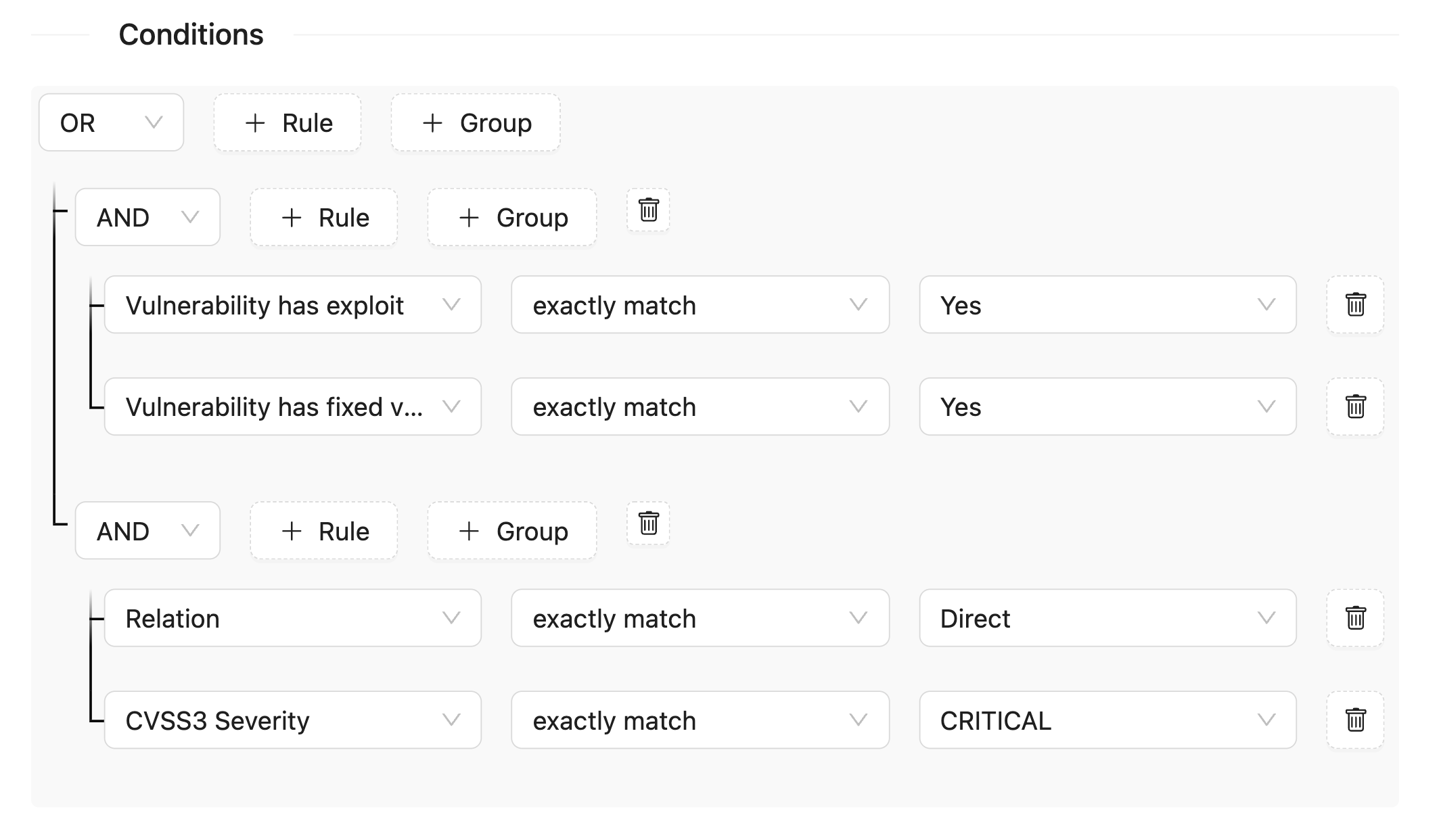
The policy becomes active immediately after creation by clicking the Create button. For the created policy, you can configure actions when it is triggered: email notification or creation of a task in Jira or Kaiten.
Important: policies are triggered during analysis, so it is important to create them before running the analysis.
Recommendation: if you leave the Proprietors, Groups and Projects fields empty, the policy will apply to all active projects in the system.