
Connecting webhooks
CodeScoring supports a webhook-based notification system. When events occur, a POST HTTP request is sent to the specified URL.
Adding a new webhook
To add a new webhook to the platform, follow these steps:
-
Go to the
Settings -> Webhookssection. -
Click the Setup new button.
-
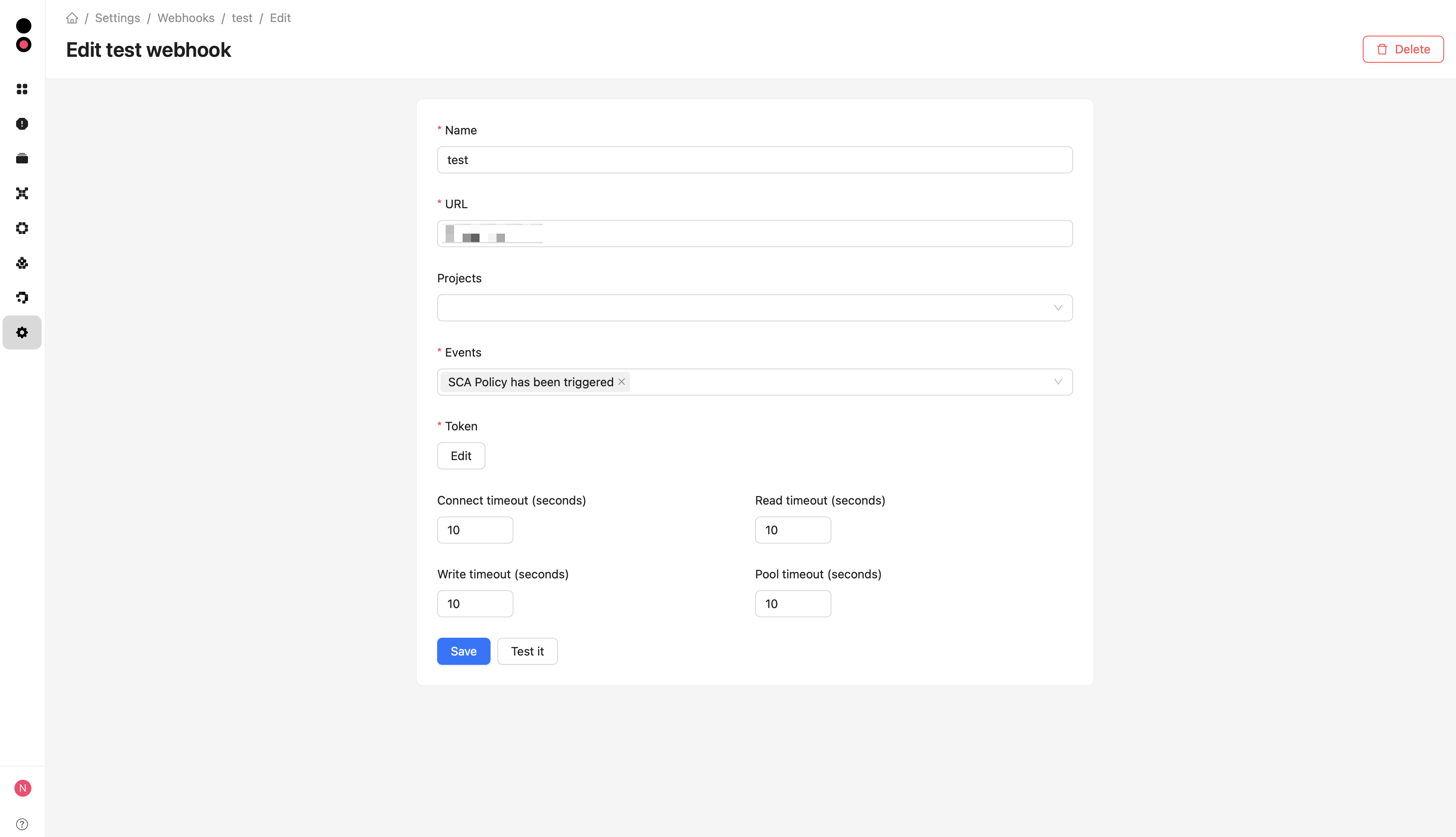
Fill in the fields in the form:
- Name – name in the CodeScoring system;
- URL – address with the protocol. For example:
http://webhook.com/; - Projects – list of projects for which webhooks will be applied. If the field is empty, all projects will be taken into account;
- Events – list of events for which the notification will be triggered;
- Token – token that is transmitted in the HTTP request (
X-CodeScoring-Authenticationheader); - Connect timeout (seconds) — time to wait for a connection to the recipient;
- Read timeout (seconds) — time to wait for response data;
- Write timeout (seconds) — time to wait when sending request data;
- Pool timeout (seconds) — time to wait for a connection from the HTTP client pool.
-
Test the connection after filling in the data by clicking the Test it button. When testing, the
testtrigger is used with an empty payload.
After creating a new connection by clicking the Setup now button, the webhook will be displayed in the section list, with the ability to view information about it (View), change the webhook parameters (Edit), or delete it (Delete).
Each timeout defaults to 10 seconds and accepts a positive integer. Values are configured separately for each webhook and apply both to event delivery and connection testing.
When editing a webhook, click Save to apply changes. To replace a saved token, click Edit in the Token field and enter the new value.
Request body structure
Request sending mechanism
Requests are processed every 5 seconds, according to a periodic task performed by the system.
A webhook usually sends one event per request. However, in the following cases, an array of events can be sent:
- Sending accumulated events: if several events occurred within a unit of time (default is 5 seconds), they will be sent in a single request;
- Retries: if the server did not respond or returned an error on the previous attempt, all unsuccessful events are resent in a single request.
HTTP codes in the range [200; 299] are considered successful. If the server's response is outside this range, the event is considered unsuccessful, accumulated, and resent according to the following schedule: 1 minute → 5 minutes → 30 minutes → 3 hours → 12 hours → 24 hours → 48 hours.
If at least one request remains unsuccessful after 48 hours, the webhook is disabled and no more events are sent.
Webhooks management via API
To manage webhooks, an API is provided at the endpoint /api/settings/webhooks with the following commands:
GET /api/settings/webhooks/— get a list of all webhooks;POST /api/settings/webhooks/— create a new webhook;GET /api/settings/webhooks/{id}/— get information by ID;PUT /api/settings/webhooks/{id}/— completely update data;PATCH /api/settings/webhooks/{id}/— partially update data;DELETE /api/settings/webhooks/{id}/— delete a webhook by ID;POST /api/settings/webhooks/{id}/refresh_availability_status/— refresh the availability status;POST /api/settings/webhooks/test/— test the connection;GET /api/settings/webhooks/triggers/— get a list of available triggers.